# ProtoRamp
ProtoRamp is a dynamic ramp/staircase shape based on Godot's Constructive Solid Geometry (CSG). It is designed to be used for prototyping levels and game mechanics.
 ## Usage
### Create a ProtoRamp
When adding a new child node, search for `ProtoRamp` and add it to the scene.
https://github.com/HLCaptain/proto-shape/assets/22623259/bccfb0e7-6799-4a94-82c4-84e5aa9d9563
Since `1.1.4`, ProtoRamp node is now independent from `CSGShape3D` base class for correct shape generation.
### Use Gizmos
ProtoRamp supports custom gizmos to adjust the shape.
https://github.com/HLCaptain/proto-shape/assets/22623259/1db3f18d-4d90-400f-9d33-7b03d44f62c7
#### Undo/Redo
You can also undo/redo changes made with the gizmos.
### Enable collisions and bake Navigation Meshes
ProtoRamp supports navigation mesh generation. It also features a toggle to enable collisions (aqua blue if enabled).
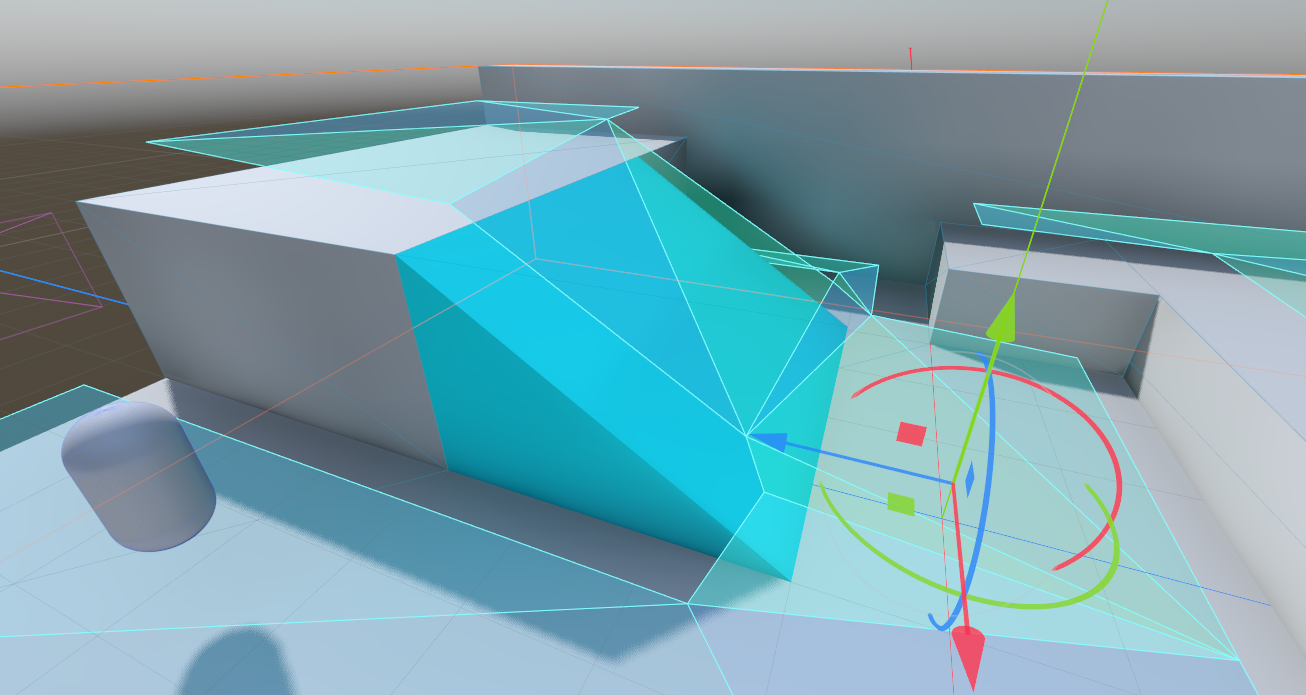
#### ProtoRampGizmos
Gizmo functionality is delegated to [ProtoRampGizmos](proto_ramp_gizmos.gd). It is a helper class that provides gizmo functionality for the `ProtoRamp` node, which only gets instantiated in the editor. This way, the packaged game will not rely on any editor-plugin specific code.
`Engine.is_editor_hint()` is used in `ProtoRamp` itself to check if the game is running in the editor. If it is, the `ProtoRampGizmos` class is instantiated and added as a child node to the `ProtoRamp` node.
### Adjust parameters
Modify height, width, depth, anchor position and more!
https://github.com/HLCaptain/proto-shape/assets/22623259/cee061ee-5c15-4e56-9c48-6eedb77409db
### Grid snapping
Grid snapping is supported for `ProtoRamp` since `1.1.3`! Holding down Ctrl enables regular snapping by 1.0 units (ramp size, not node scale unit), while holding down Ctrl + Shift enables fine snapping by 0.1 units.
### Change step counts in multiple ways
There are two ways of changing the step count:
- Fitting into `Staircase` dimensions: current width-height-depth of the staircase is respected, step dimensions will adjust.
- Using `Step` dimensions as a base: step dimensions are constant, staircase will shrink or grow to fit the steps.
Fitting in more steps:
https://github.com/HLCaptain/proto-shape/assets/22623259/f14dd269-fa6b-4ee7-a195-23d64c7cb15a
You can also use both!
https://github.com/HLCaptain/proto-shape/assets/22623259/1fdcc87e-3231-4c03-bc8f-ab0252557574
## Usage
### Create a ProtoRamp
When adding a new child node, search for `ProtoRamp` and add it to the scene.
https://github.com/HLCaptain/proto-shape/assets/22623259/bccfb0e7-6799-4a94-82c4-84e5aa9d9563
Since `1.1.4`, ProtoRamp node is now independent from `CSGShape3D` base class for correct shape generation.
### Use Gizmos
ProtoRamp supports custom gizmos to adjust the shape.
https://github.com/HLCaptain/proto-shape/assets/22623259/1db3f18d-4d90-400f-9d33-7b03d44f62c7
#### Undo/Redo
You can also undo/redo changes made with the gizmos.
### Enable collisions and bake Navigation Meshes
ProtoRamp supports navigation mesh generation. It also features a toggle to enable collisions (aqua blue if enabled).

#### ProtoRampGizmos
Gizmo functionality is delegated to [ProtoRampGizmos](proto_ramp_gizmos.gd). It is a helper class that provides gizmo functionality for the `ProtoRamp` node, which only gets instantiated in the editor. This way, the packaged game will not rely on any editor-plugin specific code.
`Engine.is_editor_hint()` is used in `ProtoRamp` itself to check if the game is running in the editor. If it is, the `ProtoRampGizmos` class is instantiated and added as a child node to the `ProtoRamp` node.
### Adjust parameters
Modify height, width, depth, anchor position and more!
https://github.com/HLCaptain/proto-shape/assets/22623259/cee061ee-5c15-4e56-9c48-6eedb77409db
### Grid snapping
Grid snapping is supported for `ProtoRamp` since `1.1.3`! Holding down Ctrl enables regular snapping by 1.0 units (ramp size, not node scale unit), while holding down Ctrl + Shift enables fine snapping by 0.1 units.
### Change step counts in multiple ways
There are two ways of changing the step count:
- Fitting into `Staircase` dimensions: current width-height-depth of the staircase is respected, step dimensions will adjust.
- Using `Step` dimensions as a base: step dimensions are constant, staircase will shrink or grow to fit the steps.
Fitting in more steps:
https://github.com/HLCaptain/proto-shape/assets/22623259/f14dd269-fa6b-4ee7-a195-23d64c7cb15a
You can also use both!
https://github.com/HLCaptain/proto-shape/assets/22623259/1fdcc87e-3231-4c03-bc8f-ab0252557574